
Maximize Savings With Group Buying

Group ordering gives neighbors, coworkers, STR guests, and local community groups a way to combine their Costco needs into a single, efficient order — with lower service fees and a streamlined pickup or delivery experience.

Why Group Orders Make Sense
When multiple people combine their lists into one shared Costco order, everyone benefits.
Your group gains:
-
Lower service fees
-
Shared transportation costs
-
One professional Costco run instead of several
-
Priority staging at the 400 West pickup location
-
A predictable schedule for busy households and STR guests
-
A cleaner, more efficient experience for everyone involved
Group orders cut the cost of convenience while raising the value of each participant’s basket.
Lower Service Fees for Group Orders
Solo orders follow the standard sliding scale:
-
20% on smaller orders
-
18% on mid-size orders
-
16% on orders over $700
Group orders automatically qualify for the lowest available tier — even when individual participants have smaller baskets. Your combined order total determines your pricing bracket, not each person’s individual list.
How Group Ordering Works
Starting a group isn’t complicated. If you can coordinate neighbors or community members, we can help you organize the entire shopping workflow.
-
Step 1 — Gather Your Members
All that matters is that everyone orders from the same Costco list.

-
Step 2 — Choose a Delivery Location
A single delivery drop-off keeps everyone’s cost low.
Pick a safe, central spot—or designate one member to receive everything.
-
Step 3 — Place Your Orders Individually
Everyone builds their own list using the Costco store platform.
Each person pays their own deposit.
-
Step 4 — Combined Shopping, Reduced Markup
When the orders are combined (I handle that):
-
Your group automatically receives the reduced applicable markup .
-
Delivery fees are shared or eliminated entirely (depending on group order size).
-
Bulk item costs can be split among members using the Co-Op Shopper Grocery Sharing App.
-
Step 5 — Delivery and Distribution
Your group gets one organized, efficient delivery. From there, each member collects their portion.
Ideal for Community Groups and STR Guests
Group orders work especially well for:
Group orders work especially well for:
-
STR properties with multiple guests arriving the same weekend
-
Neighborhoods coordinating weekly Costco runs
-
Limo and airport transport services bringing in several travelers
-
Businesses or staff groups
-
Multi-family households
-
Condo buildings
-
Church and sports groups
-
Vacation groups heading to Park City
One combined Costco order provides efficiency, simplicity, and shared savings.

Pickup at the 400 West Facility
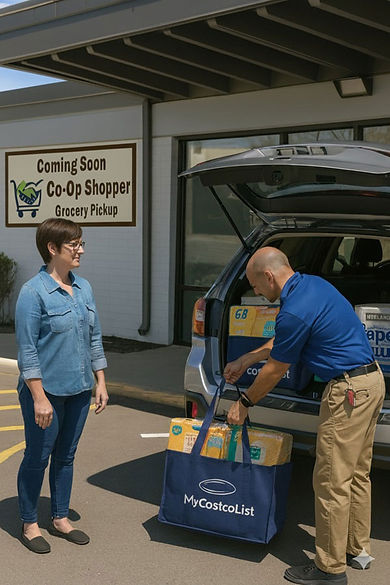
All group orders are staged at the 400 West location for fast, organized pickup.
Pickup includes:
-
Temperature-controlled storage
-
Clearly separated totes
-
Easy in-and-out access
-
Minimal detour for airport arrivals
-
A quick, professional handoff
This ensures your group gets a smooth, predictable experience.
Delivery Options
Delivery is available for groups within designated areas.
-
Zone 1: $10
-
Zone 2: $15
-
Zone 3: $20+
Group delivery must be received by a designated group contact. Frozen and refrigerated items cannot be left unattended.
Payment Structure for Group Orders
Each participant pays for their own items. Your service fee is applied to the combined order total, which creates the lower tier.
Example:
5 people place $150 each → combined order = $750
Your group qualifies for the 16% service fee tier. Everyone benefits from one large shared total.
FAQ — Group Shopping & Savings
How many people do I need to form a group?
Most groups start with 3–5 members, but even two households can benefit.
Do we all have to order the same items?
No. Everyone builds their own list. You only share items if you choose to.

Can a group split multipack and single bulk packaged items?
Yes. The Grocery Sharing App streamlines how groups split costs, tax, and tips across shared items. It also includes a step-by-step guide for dividing Costco bulk and multipack products, along with a video walkthrough for added clarity.
Is the reduced markup guaranteed?
Yes—when orders are combined for the same shopping trip.
Who pays the delivery fee?
The group decides.
Some split it evenly. Others have one person cover delivery in exchange for the best pick of bulk items.
Can this happen weekly or monthly?
Absolutely. Communities can run recurring group orders to keep groceries consistent and cost-effective.
Is a shared delivery location required?
Yes. This is how the savings stay high. Groups pick one location that works for everyone.
Can groups outside Utah participate?
Yes. Groups anywhere can use the platform.
Shopping services depend on regional availability.